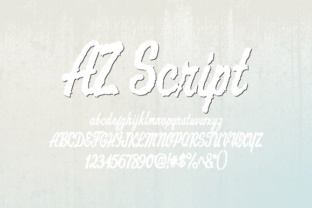
AZ Script: A Rough Edgy Script Font for Editorial Design
Choosing the right font can transform a design from ordinary to unforgettable. Recently, I found myself in the midst of redesigning a lifestyle blog’s header, and it was during this moment that AZ Script, a rough edgy script font, caught my eye. Its imperfections and handcrafted feel made it stand out as a perfect fit for a project aiming to evoke nostalgia and authenticity.
AZ Script for Lifestyle Blogs and Nostalgic Branding
AZ Script is a script handwritten font that feels like it was scribbled on paper with a pen that ran dry mid-stroke. The lines are uneven, the curves are unpredictable, and yet there’s a charm to its imperfection that speaks directly to the soul of editorial design. For a lifestyle blog that leans into vintage aesthetics or retro themes, AZ Script brings an air of authenticity that polished fonts simply cannot match.
I tested AZ Script in a blog header and noticed how it naturally drew attention without being overwhelming. It worked especially well when paired with a clean sans serif font for navigation links and body text. This kind of font pairing ensures readability while maintaining a unique visual identity that aligns with the brand’s mood.
AZ Script in Recipe Ebooks and Handwritten Recipes
In the world of recipe ebooks, where the goal is often to create a warm and inviting atmosphere, AZ Script shines as a font that feels personal and approachable. When I used it for a section titled “Sunday Brunch Ideas,” the title immediately felt more like a handwritten note from a friend than a formal heading.
The irregularity of AZ Script makes it ideal for titles and pull quotes, but not for dense paragraphs. In a recipe ebook, I would recommend using it sparingly—perhaps for chapter openers, section headings, or decorative accents. This way, the reader is guided through the content with visual interest without losing clarity.
AZ Script for Wedding Guides and Vintage-Themed Publications
If you’re designing a wedding guide or any publication that leans into a vintage aesthetic, AZ Script could be your go-to font for creating that old-looking design. The font’s rough edges and uneven strokes mimic the look of aged handwriting, which can add a sense of history and intimacy to the layout.
When I applied AZ Script to a sample wedding invitation, the result was elegant yet unpolished—a contrast that felt both modern and timeless. It’s important to note that while AZ Script works beautifully for headlines and decorative elements, it may not be suitable for small captions or long-form content due to its legibility challenges at smaller sizes.
AZ Script in Coaching Workbooks and Creative Printables
For coaching workbooks or creative printables, the personality of AZ Script adds a layer of engagement that traditional fonts might lack. When I used it in a printable planner, the title “Daily Reflections” took on a new dimension, feeling more like a personal journal entry than a generic worksheet.
However, I also discovered that AZ Script should be used with caution in longer reading sections. Its irregularity can make it difficult to read over extended periods, especially on screens or in mobile layouts. For these reasons, it's best suited for short bursts of text such as headers, chapter titles, or decorative elements.
AZ Script for Newsletter Headers and Digital Magazine Layouts
Newsletter headers and digital magazine layouts benefit greatly from a font that commands attention while maintaining a sense of style. AZ Script has the ability to do just that. I tested it in a newsletter header for a creator-focused publication, and it instantly elevated the design with its raw, expressive character.
To ensure the overall layout remained readable, I paired AZ Script with a high-contrast serif font for the body copy. This combination allowed the newsletter to maintain a cohesive look while ensuring that the content remained easy to read across different devices and screen sizes.
Before finalizing any design that uses AZ Script, it's crucial to check the font’s available styles, ligatures, and commercial licensing. As a designer, knowing what tools you have at your disposal helps avoid any last-minute issues when exporting files for print or digital use.